Using Pegasus Mail
8/22/00
What is it?
Pegasus mail is an e-mail application. It is not a web-based e-mail program, such as VUMail. Pegasus is loaded on the circulation workstations, and accessed through an icon on the Novell window.
Purpose
Pegasus mail is used mainly to notify patrons that ILL or Annex material has arrived for them. Any announcements made to staff who work in the General Libraries Building
How to Use
First, make sure that only one of the two circulation workstations has Pegasus open. Even though Pegasus is displayed as being available on both workstations, it should always be used one at a time.
Second, review the images below.
1)
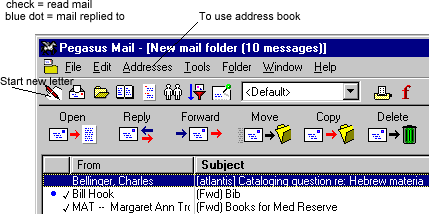
When you first open Pegasus: you will see 3 rows of commands -- a menu bar, a row of small icons, and a row of large icons. For Library purposes, you usually only need to use the "Start New Letter" button and use the Address Book.
2)
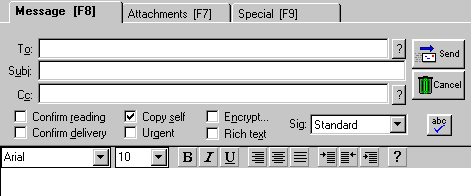
When you start a new letter, the image below will open up under the 3 command lines. Make sure the copy self pane is checked. If you are not using the Address book, simply type in the full e-mail address in the "To" field and include an appropriate subject. Text may be formatted as in Word. The "Send" button is to the right.
If you are using the Address Book, you will need to put the blinking cursor in the "To" field first.
3)
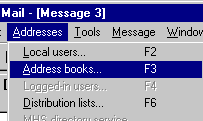
To use the Address Book, you will go to the Menu Bar and select Address and Address Books.
3)
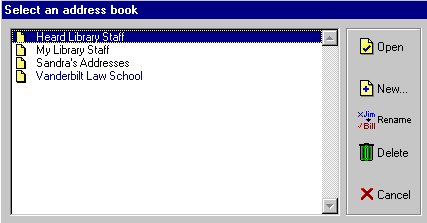
You will then see a list of available address books. You will usually need the "Heard Library Staff" address book. Highlight your choice (as below) and select "Open."
4)
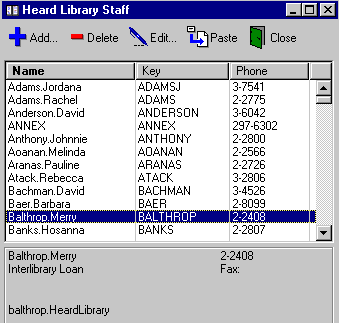
Go to the name that you need by typing the first 2 or 3 letters of the last name in rapid succession, OR by scrolling down and highlighting your selection. You can double-click or use "Paste" to put the name in the field. Close the Address Book when you are done.
done