PHONE LIGHT INDICATORS AND MESSAGES
(updated 6/15/00)
D-Term phones, such as as Circulation and Reference/Infodesk
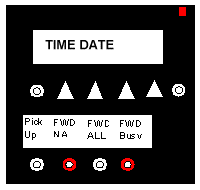
Here is a "cartoon" version of the top of a D-Term. The little rectangle at the top right is the message indicator. If it is clear, there are no messages. If it is red, as in the drawing, there is a message.
If the indicator is red, you should retrieve the message:
The FWD NA light should always be on! If it is not on, you must set it. This will insure that all calls that are not picked up go directly to voice mail.
The FWD BUSY light can be set to whatever seems best. For example:
Let's say that someone calls the Reference Desk but the phone is in use. When FWD BUSY is on, the call will get transferred somewhere. If Sandra is working, she may want it to roll to her office. If no librarians are working, they may all want the messages to go to the Reference Desk VOICE MAIL.
Set the FWD BUSY in the same way as FWD NA. If you want the phone to go to a person instead of voice mail, use that desired number instead of "6-0000".
Donna Smith is the phone/telecommunications contact in the Divinity Library. Notify her if you have problems.
Return to Circulation Index