A common problem when patrons cannot renew their books on ACORN or cannot check their user records is related to their PIN. Or, sometimes users forget their PINs. To reset their PIN, follow these steps:
- Click on the "User Maintenance" button, which will open the User group of Wizards.

- Select the "Modify User" button -- person with eraser-side of the pencil.
- You will see several "Tabs" across the top of the record. Select the "Privilege" tab.
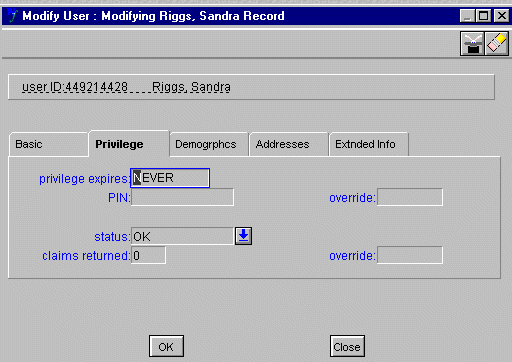
- Highlight everything in the PIN field. You will not see any numbers. Hit delete on the keyboard.
- Now, type in the first four digits of the user's social security number. Type in your "override" password in the OVERRIDE field next to the PIN field.
- Click "OK" to update the record.
- Tell the user to try accessing their record on ACORN again. If the patron still has problems, report this problem to a PST member and inform the user that someone will get back to them. Help them to access their account through the public ACORN.