These books are distinguished from other books that arrive from
Baker by the
absence of barcodes attached to the inside front cover and the back cover of
the book
1. From the Cataloging module, search the title in WorkFlows to verify that
the book is not a duplicate.
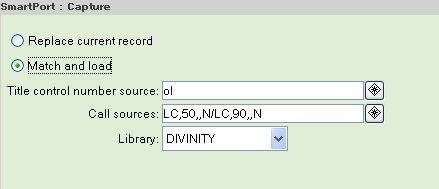
2. Search for the title in OCLC using the Smartport
Option or the OCLC Export Option.
If a record is not found in OCLC, a provisional record must be created.
Give to Jill with a note.
3. Charge the book to Jill's number 204048.
Obsolete documentation below - please disregard
OCLC Export Option (This option does not allow immediate access to the record in Acorn. The record will be overlaid usually within the hour.
Search for the book in the OCLC database using the search strategies on the OCLC Searching webpage. Verify that the record matches the book paying particularly attention to the 260 field that contains the publisher and the copyright date.
Use the F4 function key to get to the end of the record. Add a field by using a decimal number added to the last line number. Example: 12 becomes 12.2. Begin a text string in the home position while still on the last screen of the record as follows:
12.2 949 |h DIV [press F11]
Note: one space between the line number and the 949 ;
five spaces between the 949 and the delimiter h ;
the delimiter h is constructed by holding down the control key and press the letter d ;
one space between the delimiter h and DIV ;
press the function key F11
reformat by pressing F2
press F4 to the end of the record to verify that the line has been added correctly
(12.2 will have been replaced by 13)
at the home position type xpo [F11]
Message appears that the record has been exported
Type a u in the home position and press F11
Place a u on the inside back cover of the book to indicate it
has been updated in OCLC
The OCLC record will not appear in Acorn until Systems loads the records (every hour).
To finish the editing process in Acorn, search the record later in the day appropriate for each record (Books with LC Copy or Member Library Cataloging).