A common problem when patrons try to check books out is an expired user record. While we can change the expiration dates in Staff, Alum, and Div-Only records, we should not do so for Faculty and Students. Before changing the expiration date in any records, verify that there is not a note in the comments or note field telling you not to change the expiration date.
STUDENTS: Student status and expiration dates
are set by the tapeload and should not be changed. There are occasions when student
records have to be created, since a student may have enrolled between tapeloads. In
these few occasions, or when you change student information that the registrar does not
have, it is very important that you notify the registrar's office. The tapeload could
"erase" the current address information. Student records already in the
system should not be changed.
STAFF & ALUM: Staff expiration dates are a year from the date the
card is issued/renewed. So, these expire at various points throughout the year. If a staff
member's Acorn record is expired, and there is no information in the record (in the notes
or comments fields) that they have been terminated from employment or have no problems,
then any division can update the record, move the expiration date forward a year, verify
address, etc.
FACULTY: Faculty expiration dates are generally "never."
Faculty records are not tapeloaded, so these are entered manually by divisions as faculty
members appear at the libraries. Some small percentage of faculty records do have
expiration dates, because they are here on term appointments. Sometimes we get this
information from the Provost's Office, sometimes the faculty member advises us of it, but
we generally assume the "never" date unless we have evidence to the contrary.
DIV-ONLY: (Local Clergy, Jewish Community, Kesler) These expiration dates
are a year from the date the card is issued/renewed. So, these expire at various points
throughout the year. If a staff member's Acorn record is expired, and there is no
information in the record (in the notes or comments fields) that they have problems on
their record, then any division can update the record, move the expiration date forward a
year, verify address, etc.
- Select the "User Maintenance" button to access all the User group wizards.
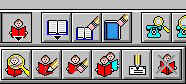
- Select the "Modify User" button -- person w/pencil eraser-side down
- Find the patron record by name or ID
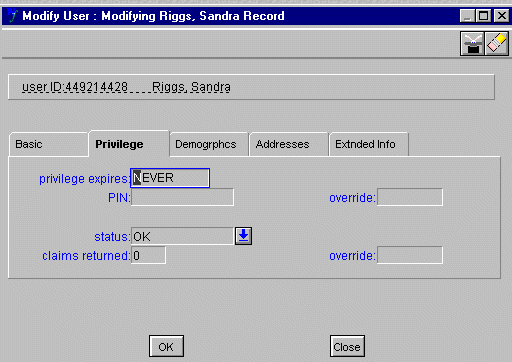
- Make sure there is not a message from Elain Goleski stating not to renew the patron. It would show up as a red "ALERT" "NOTE" or "COMMENTS" message. You may also want to check the "Extnded Info" tab for messages.
- As I am library staff, my privilege field is "Never", but this is the field you will change.
- REMINDER: If the patron is a student or faculty member, do not change their expiration date because this is set system-wide. A student may not be enrolled for the current semester, a faculty member's or staff member's status may have changed. If the patron persists, send an e-mail to Elaine Goleski.
- If the patron is a local clergy/jewish community member, staff, or alum, you can change the Expiration date to a year from the current date. Tab to the OVERRIDE field and input your override password.
- Hit <enter> or click "OK"
- Verify their address information. (See also: Address Changes in User Records on ACORN)